Skip to content

Capability / 01

Software Engineering

Software engineered around the problem.

PACSAL (Programming, Advanced Cyber-Security & Automation Lab) designs and builds SaaS applications, web applications, business platforms, internal tools, APIs and integrations, dashboards, custom software systems, and desktop applications around real operational requirements.

We focus on clear architecture, maintainable engineering, practical performance, and software that can evolve as the requirements grow.

DesignBuildValidateDeployEvolve

  1. InterfaceWeb · Desktop · Dashboard
  2. ApplicationSaaS · Platforms · Internal tools
  3. API LayerREST · Auth · Webhooks
  4. ServicesBusiness logic · Workers
  5. Data LayerDatabase · Storage · Cache
  6. IntegrationsThird-party · External
  • Security
  • Observability
  • Automation
  • Deployment

System / Software

From interface to infrastructure.

Software quality is shaped by the complete system, not just the visible interface. PACSAL (Programming, Advanced Cyber-Security & Automation Lab) treats application logic, APIs, data, integrations, deployment, and maintainability as parts of one architecture.

Architecture / request path

Cross-cutting support

Software / Systems

Software built for how the business actually works.

From customer-facing SaaS products to internal operational systems, PACSAL (Programming, Advanced Cyber-Security & Automation Lab) designs software around the workflow, users, integrations, and technical requirements of the problem.

  • 01

    Digital Products

    Software products people use: on the web, as a subscription service, or installed on their machine.

    • SaaS ApplicationsSubscription-based software products designed for multi-user workflows, scalable features, and ongoing operation.
    • Web ApplicationsInteractive browser-based applications that go beyond static websites and support real business processes.
    • Desktop ApplicationsNative or packaged desktop software for workflows that benefit from local system access, offline operation, or local processing.
  • 02

    Business Operations

    Systems a business runs on, built around its own workflows rather than a standard template.

    • Business PlatformsIntegrated systems for managing important business functions, users, workflows, and operational data.
    • Internal ToolsPurpose-built software for employees and teams to manage work, information, approvals, and internal processes.
    • Custom Software SystemsSoftware designed around requirements that do not fit an off-the-shelf product or standard template.
  • 03

    System Interfaces

    The views and connections that keep a system understandable and joined to everything around it.

    • Dashboards & Admin SystemsInterfaces for monitoring, managing, configuring, and understanding operational systems.
    • API Development & IntegrationsAPIs and system connections that let applications, services, and third-party platforms exchange data and trigger workflows.

Also supported

  • Customer Portals
  • Commerce Systems
  • Workflow Interfaces
  • Platform Modernization
  • Existing System Extensions
  • Legacy System Improvement

Principles / 06

Built to remain understandable.

A system that works today but cannot be safely changed tomorrow is unfinished engineering.

01Clear ArchitectureSystem boundaries and responsibilities should be understandable.
02Maintainable CodeStructure code so future changes do not require rediscovering the entire system.
03Practical PerformanceOptimize the parts of the system that materially affect users and operations.
04Security-Aware EngineeringSecurity belongs inside architecture and implementation, not at the end.
05Observable SystemsImportant behavior should be visible, measurable, and diagnosable.
06Controlled ComplexityUse complexity only where the problem genuinely requires it.

Process / Software

From requirement to running system.

A disciplined process keeps technical decisions connected to the actual problem.

  1. 01

    Discover

    Understand users, operations, constraints, existing systems, and the real problem.

  2. 02

    Architect

    Define system boundaries, interfaces, data flow, integrations, and security requirements.

  3. 03

    Build

    Implement the system in manageable, testable components.

  4. 04

    Validate

    Test behavior, edge cases, integrations, performance, and architecture assumptions.

  5. 05

    Deploy

    Move the software into a controlled operational environment.

  6. 06

    Evolve

    Observe real usage, fix friction, and extend the system deliberately.

Stack

Tools selected for the system, not the trend.

PACSAL's core team, with vetted specialists brought in per project, works across the stacks below. The main tools are listed; the choice for each project depends on its architecture, deployment, performance, and long-term maintenance needs.

  • Business Websites

    • WordPress
    • Shopify
    • Webflow
    • Next.js
    • Custom builds
  • Web Apps & SaaS

    • React / Next.js
    • Node.js (MERN)
    • Laravel / PHP
    • Python / FastAPI
  • Mobile Apps

    • React Native
    • Flutter
  • Databases

    • MySQL
    • PostgreSQL
    • MongoDB
    • SQLite
    • Supabase
  • Cloud & Hosting

    • AWS
    • Vercel
    • DigitalOcean
    • Docker
  • Security Testing

    • Burp Suite
    • OWASP ZAP
    • Nmap
    • Metasploit
  • Automation & AI

    • OpenAI & Claude APIs
    • Local AI models
    • n8n / Zapier
    • Python automation
  • Chosen per project

    We recommend a stack in writing, with the reasons, before work starts. Desktop tools such as Rust and Tauri appear in the Socium and CyberTool.dev case studies.

Work / Software

Software in practice.

Selected PACSAL (Programming, Advanced Cyber-Security & Automation Lab) systems where software engineering connects directly to real operational requirements.

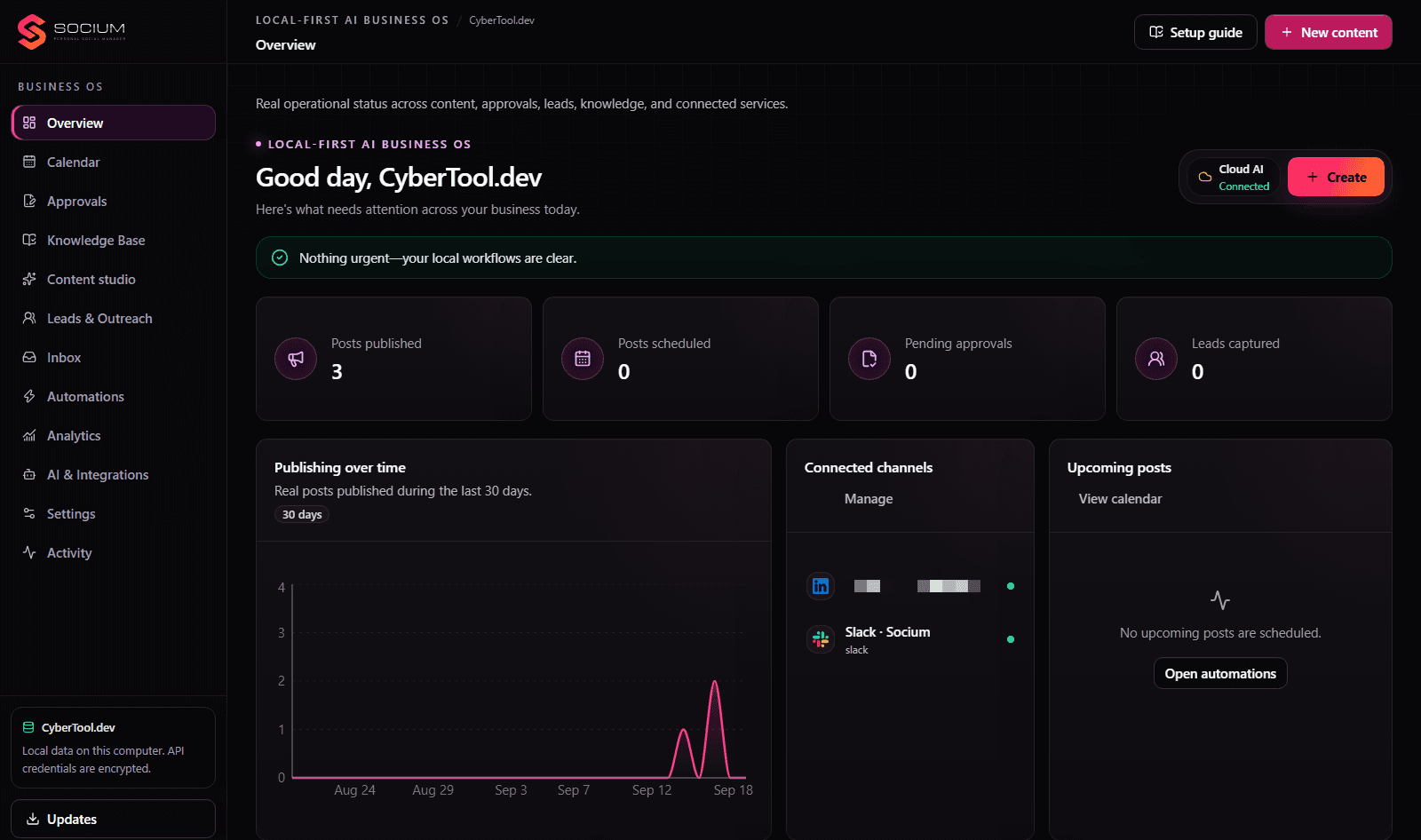
  • Socium overview: publishing, scheduling, approval and lead status beside the business OS navigation

    AI Business Operating System

    Socium

    A local-first AI Business Operating System combining business knowledge, approvals, inbox workflows, publishing, automations, and AI-assisted operations in one local-first platform.

    • Local-First Architecture
    • Workflow Engine
    • Approval System
    • Durable State
    • Integrations
    • AI Orchestration

    Socium combines a Next.js console with a local service architecture and durable local state to keep business workflows, approvals, knowledge, and automation under user control.

    View Socium
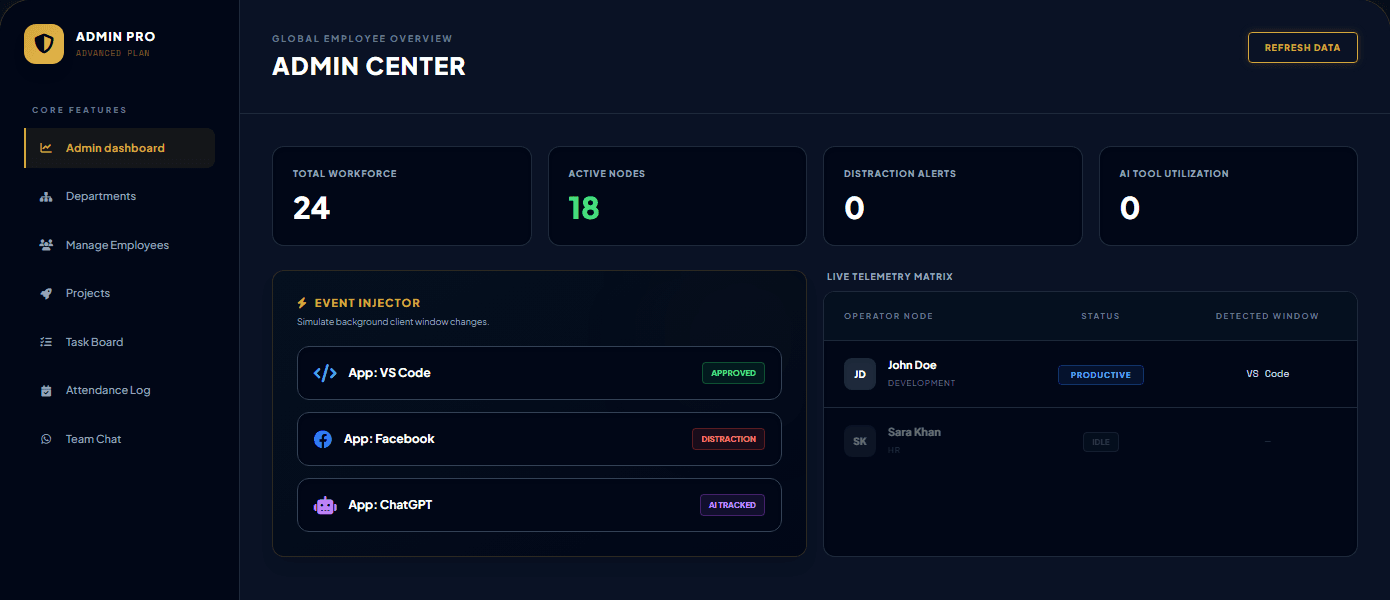
  • EAMS admin center demo: workforce, active nodes, distraction alerts and live telemetry by employee

    Employee Activity Monitoring System

    EAMS

    A workforce visibility and monitoring platform designed around activity tracking, operational dashboards, shift-based reporting, and structured SaaS deployment.

    • Workforce Monitoring
    • Activity Visibility
    • Shift Tracking
    • Operational Dashboards
    • SaaS Architecture
    • Deployment Plans
    View EAMS

PACSAL (Programming, Advanced Cyber-Security & Automation Lab) / Integrated

Software does not operate alone.

The most reliable software systems are designed with security and automation in mind from the beginning.

  1. Software01
    • Architecture
    • Application
    • Data
    • Integrations
  2. Security02
    • Validation
    • Hardening
    • Monitoring
    • Access Control
  3. Automation03
    • Background Jobs
    • Workflows
    • Approvals
    • Notifications
  4. Operable System
    • Operated
    • Secured
    • Extended
    • Automated

Software + Security + Automation

PACSAL (Programming, Advanced Cyber-Security & Automation Lab) software engineering does not stop at code delivery. The goal is a system that can be operated, secured, extended, and automated.

Architect · Build · Deploy

Need software built around a real operational problem?

Tell PACSAL (Programming, Advanced Cyber-Security & Automation Lab) what you are building, replacing, integrating, or trying to improve.